
Shopify SEO checklist for product pages: 10 points
By Guillaume at Kopalia ·
The short answer
Check ten things on a Shopify product page before it goes live:
- a description that answers buyers’ questions;
- specs, each in its own field;
- alt text on every image;
- links to your collections;
- an SEO title (the title shown in Google) written for that page;
- a meta description (the text shown under that title) that says what the product is;
- one version per language;
- a product title that names the product, in the page’s language;
- a short URL handle (the end of the page’s address) you no longer change;
- product data Google can read.
Kopalia does points 1 to 7 (for point 3, the images in the description); points 8 to 10 are yours.
Guillaume, Kopalia’s founder, has done SEO since 2007 and has ranked sites first on Google for some of the most contested searches in their markets. This is the list he runs on every product page before it goes live.
The 10-point checklist
| Point | Where in the admin | The rule | Source | How to check |
|---|---|---|---|---|
| 1. Description | Description | Answers buyers’ questions with sourced facts, not copied text | Checked against your sources | |
| 2. Specs | Metafields | One value per field, each from a source | Shopify | The filled fields in the admin |
| 3. Alt text | Media, on each image; images in the description | What the image shows; Shopify recommends 125 characters or fewer (512 at most) | Shopify, Google | In the admin, image by image |
| 4. Internal links | Description | Links to your collections, on words that say where they lead | Click every link | |
| 5. SEO title | Search engine listing › Page title | About 60 characters, 70 at most; unique to the page, no keyword lists | Shopify, Google | The admin’s character counter |
| 6. Meta description | Search engine listing › Meta description | About 160 characters: what the product is, and who it’s for | Shopify, Google | The admin’s character counter |
| 7. Languages | Settings › Languages, then translations | Each published language has its own URLs; SEO title, meta and alt text are translated too | Shopify, Google | Open each language’s page |
| 8. Product title | Title | Names the product and its main feature, in the page’s language | On the live page, in every language | |
| 9. URL handle | Search engine listing › URL handle | Short, in your buyers’ language; change it as little as possible, and redirect the old address | Shopify, Google | The live page’s address |
| 10. Product data | No field: your theme adds it | Check that Google reads it | Shopify, Google | Google’s Rich Results Test |
What no tool should make up
Start here, because it is where AI-written product pages go wrong. A description generator, a ChatGPT prompt or a freelancer can all produce a page that ticks every box above and still states something the supplier never said. Four kinds of details must only be written with a source in front of you:
- numbers: dimensions, weight, maximum load, battery life;
- materials and composition;
- compatibility (“fits…”, “works with…”);
- certifications and standards.
If the supplier doesn’t give one, ask for it, or leave it out. The same goes for the SEO title and meta description: they summarize the page, they don’t add promises it doesn’t make.
Point by point
Points 1 and 2 are for the buyer first, points 3 to 6 for Google, point 7 for your other languages. Points 8 to 10 are set outside the description: the product title, its address, and your theme.
1. Description
Answer buyers’ questions in the order they ask them. Google asks whether content based on other sources simply copies or rewrites them, or adds real value (Google, helpful content). The supplier’s text, pasted on every store that sells the product, adds none. Our guide How to write a Shopify product description has the full method and a template. For three before-and-after examples, see 3 AliExpress listings turned into Shopify product pages.
2. Specs
Material, dimensions, weight, what’s in the box: each in its own field. Once you pick the product’s category, the admin offers metafields for that category, and a store can declare its own. Every value comes from a source: the spec sheet, the manual, your own measurements. What no source gives stays empty, or goes back to the supplier as a question.

3. Alt text
It describes the image to people who can’t see it, and shows if the image fails to load. Shopify allows 512 characters and recommends 125 or fewer (Shopify). Google calls it the most important attribute for describing an image, to be written without keyword stuffing (Google, images). Check two places: gallery photos, one by one under Media, and the images placed in the description, which each carry their own text.

4. Internal links
Google uses links to find your pages and judge their relevance, and the link text tells it, like your buyer, where a link leads (Google, links). In the description, link to the product’s collection on words that name it (“our camping chairs”, not “click here”).

/collections/camping-outdoor).5. SEO title
It is the “Page title” in the Search engine listing section at the bottom of the product page. Shopify allows 70 characters and suggests staying at 60 or fewer so search results don’t shorten it (Shopify Help Center). Google asks for descriptive, concise titles, distinct for each page, and may generate its own title link when yours doesn’t represent the page well (Google, title links).
6. Meta description
Shopify recommends 160 characters (Shopify) and warns that past 320 it may be cut off in results (Shopify, products). Google sometimes uses it as the snippet when it describes the page more accurately than the page content does; long strings of keywords are unlikely to be shown (Google, snippets). One sentence: what it is, who it’s for, what sets it apart.

7. One version per language
On Shopify, each published language gets its own URLs, and languages are added to the sitemap automatically (Shopify, languages; sitemap). Google recommends pointing to each version of a page with hreflang tags (Google, localized versions). Translate the title, SEO title, meta description and alt text, not just the description. To check, open each version and look at four things: the product title, the SEO title, the meta description and the alt text; a language URL can still show untranslated text.
8. Product title
Name the product: type, brand or model, main feature. Not a string of keywords: Google warns that keyword stuffing can make a site look like spam (Google, title links). Write it in the page’s language: if a title doesn’t match the language of the page’s main content, Google may pick different text for the title link (same page). On a two-language store, a title left in English on the French page is worth fixing.

folding-camping-chair-backrest (point 9).9. URL handle
Google recommends simple, descriptive words in your audience’s language (Google, URL structure). Shopify builds the handle from the title when the product is created, so a long supplier title becomes a long address: shorten it before the page goes live. After that, don’t edit it often, or the product might not show in search results (Shopify); if you do change it, create a redirect from the old address (Shopify, URL redirects).
10. Product data
Structured data tells Google the product’s name, price and availability. You don’t fill it in: according to Shopify, Shopify-supported themes and Theme Store themes include it by default (Shopify). Reviews only appear in it if a reviews app provides them; our demo page carries none. Check one page with Google’s Rich Results Test, the tool Google recommends for validating this markup (Google, product snippets). A heavily edited theme, or an app that adds its own markup, can break or duplicate it.
What Shopify and your theme already do
Checked on November 9 and 10, 2026 on Kopalia’s demo store (Horizon theme, two languages), not claimed for every store:
- Sitemap: Shopify generates one at
/sitemap.xmland updates it when you add a product (Shopify). - Product data: the product page carried
Productmarkup (name, description, image, offer). - Language versions: the French page carried
hreflangtags for English, French and a default version. The Shopify help pages we read don’t mention it: check your own store.
Still yours, page by page: points 1 to 6, 8 and 9, and the translations in point 7.
Check your page
- Rich Results Test (search.google.com/test/rich-results): paste the live page’s address to see whether Google reads its product data.
- Search Console URL Inspection (Google Help): if your store is verified there, it tells you whether the page is indexed and which address Google keeps.
- The page itself, in every language: title, address, links and images, on a phone.
Doing it with Kopalia
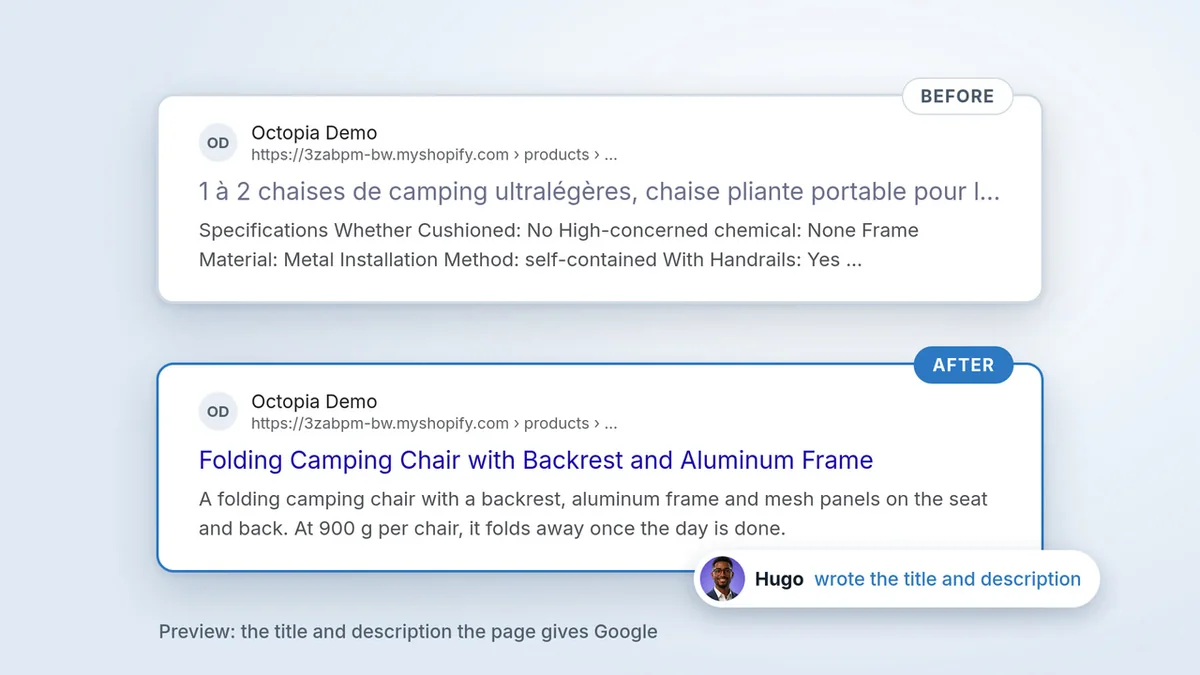
Kopalia: AI Product Pages, a Shopify app published by MG Innovations, handles seven of these points, points 1 to 7; for point 3, the images it places in the description. Its 25 AI specialists read your sources (your Shopify product page, plus an AliExpress or Amazon listing if you paste its link), write the description and the alt text of the images they place in it, put specs into your store’s fields, add links to your collections and translate the page into the languages you publish; Elise, the team’s proofreader, reviews every translation. Hugo, the team’s SEO specialist, writes the SEO title and meta description for each language; before anything is published, you see what the page carries now next to what he proposes, and you choose.
What it doesn’t do: change or translate your product title, change its URL handle (points 8 and 9), touch your theme’s product data (point 10), write alt text for gallery photos, or find details no source gives. What’s missing is flagged, not made up. And no tool guarantees a ranking.
Try it with the link to one of your products.
The video transcript
This listing came from AliExpress. Here it is, rebuilt by Kopalia. And on Google, here’s how it looked… and here’s how it looks now.
Hugo, Kopalia’s SEO specialist, wrote the page title and meta description. And I make the call: I publish.
On every product page, I check ten points. Kopalia handles seven. The other three are yours: I’ll show you at the end.
Hi, I’m Guillaume, Kopalia’s founder. Since 2007, I’ve ranked sites number one on Google, for some of the most competitive searches in their markets. I’m pasting my supplier’s link, and launching Kopalia’s twenty-five AI specialists.
One and two: what the buyer reads. A description that answers their questions: here, seven sections, each with its own heading. And the specs, each in its own field: dimensions, installation, material, package contents. The seller lists no weight capacity: Kopalia doesn’t make one up. The field stays empty.
Three to six: what Google reads. Alternative text for every image in the description: for example, an orange-framed chair by a lake at sunset. Links to your collections: here, the word “camping” leads to the Camping & Outdoor collection. Then the page title and meta description. Hugo writes both for each language; I compare them to what’s live, and publish his.
Seven: one version per language, each at its own address. Sofia translates, Elise checks it reads naturally, then Aurora publishes in every language your store offers.
Now it’s your turn. Eight: the product title. Keep it short: the product name. Kopalia doesn’t touch it: I shortened this one myself. Nine: its handle. Shopify builds it from the title. Shorten it before going live, then avoid changing it. Ten: structured product data for Google. Your theme adds it. Check yours: the method is in the guide.
Your first listing is free, no credit card required. The full checklist is in the guide. The link is in the description. Thanks, and see you soon.
Frequently asked questions
Does Shopify add structured data?
According to its Help Center, yes: Shopify-supported themes and Theme Store themes include data on the product, its price, availability and reviews. A modified theme or an app can change that markup, so run one page through Google’s Rich Results Test.
Does the meta description affect rankings?
The Google pages we read don’t describe it as a ranking factor. They say it may be used as the snippet under the title when it describes the page better than the page content. Its job is to earn the click.
Should I change the URL handle of a live product?
Only if it’s really bad. Shopify advises against editing it often. If you change it, create a redirect from the old address so links and visits still land.
How long should a Shopify SEO title be?
Shopify allows 70 characters and suggests 60 or fewer. Google sets no limit but truncates titles to fit the screen: a short title that names the product works best.
Try it on one of your products
From your sources, Kopalia drafts the description, specs and SEO fields, places your images in the description and prepares translations. You keep your product title. What's missing is flagged for you to fill in, and nothing goes live without your go-ahead.
No credit card. On Shopify, the app connects to your store; on WooCommerce and PrestaShop, a product page address is enough.